Send a WhatsApp Campaign
A campaign goes out from the CRM at yoglovecrm.yoglove.workers.dev/admin. The whole thing takes about two minutes.
Step 1: Open your templates
WhatsApp, then WhatsApp templates
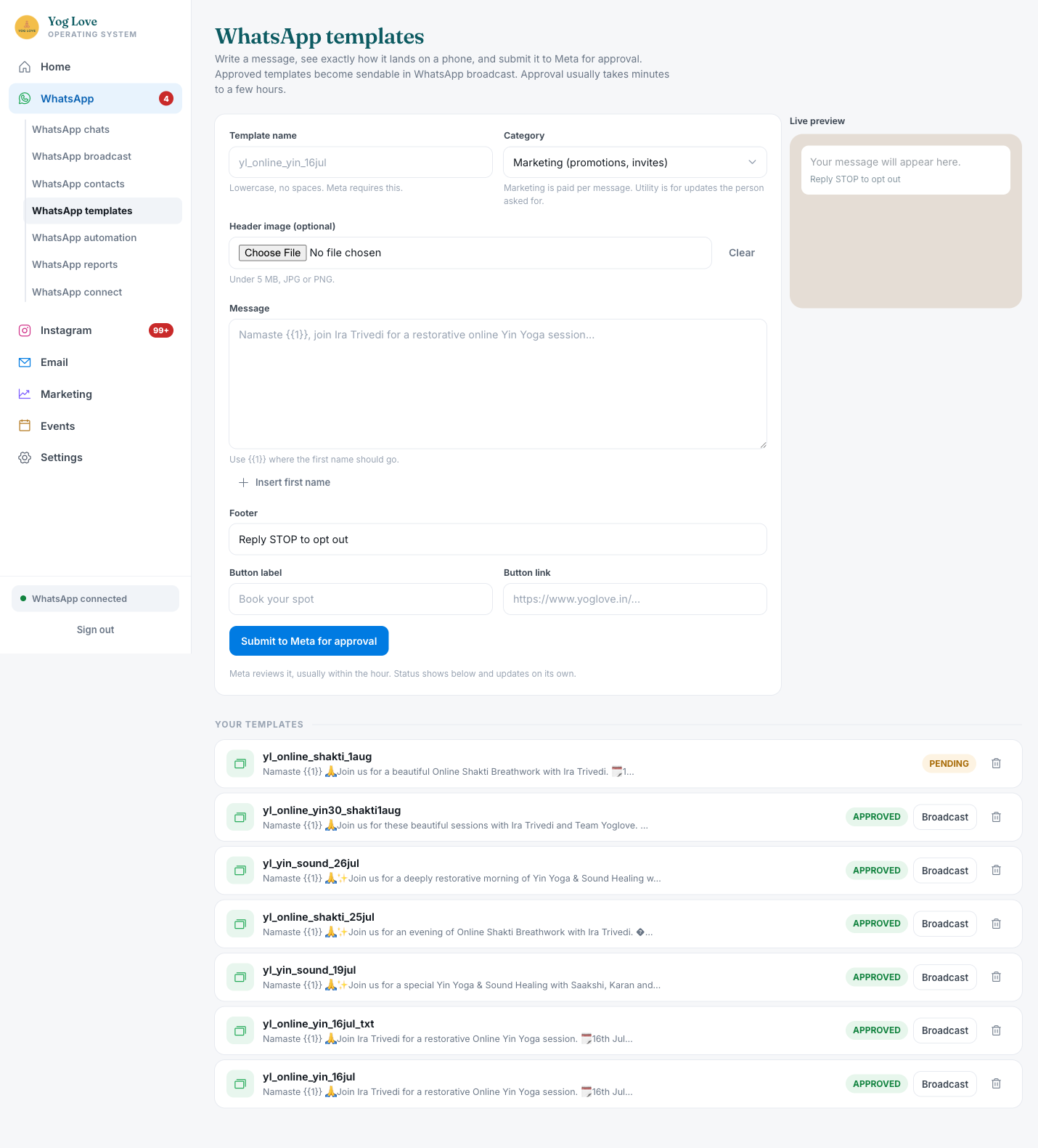
Log into the CRM. In the left sidebar click WhatsApp, then WhatsApp templates underneath it.
Scroll to Your templates at the bottom. Every message you have ever built is listed there with its status.
Read the status badge
APPROVED means Meta has cleared it and it is ready to send. These have a Broadcast button next to them.
PENDING means Meta is still reviewing it. There is no Broadcast button yet. You cannot send it, and there is nothing to fix, you just wait.
Step 2: Hit Broadcast on the one you want
One click
Find an APPROVED template and click its Broadcast button. That takes you straight to the send screen with the template already filled in.
You do not need to retype anything or remember the template name.
Step 3: Fill in the send screen
Audience
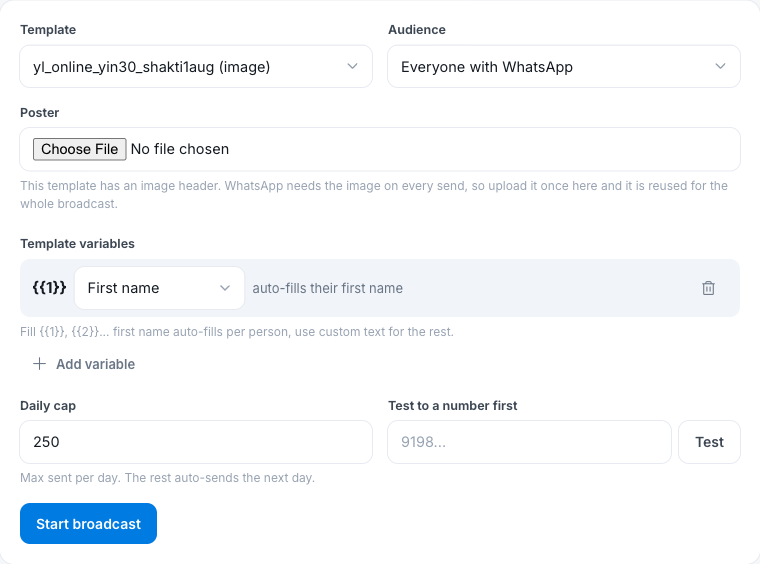
Pick who gets it from the dropdown. Your options are:
- Everyone with WhatsApp — the full list
- Instagram leads — people who came in through Instagram
- In pipeline — enquired but not booked yet
- Booked — already booked something
- Customers — past paying attendees
For a class promotion, In pipeline and Customers respond best. Blasting everyone every time is what damages your number.
Poster, if it asks for one
If the template has an image at the top, the form shows a Poster upload. WhatsApp needs that image attached on every single send, so you upload it once here and it gets reused for the whole broadcast.
If there is no Poster box, the template is text only and there is nothing to do.
Template variables
{{1}} should be set to First name. It already is by default. That is what makes each message open with the person's actual name instead of "Namaste {{1}}".
Leave it alone unless your template has extra blanks, in which case use Custom text for those.
Daily cap
Leave this at 250. That is what Meta allows on the number per day.
If your audience is bigger than 250, nothing breaks and nothing is lost. It sends 250 today and picks up automatically tomorrow.
Test it on yourself first
Put your own number in Test to a number first and click Test. You get the message on your phone in a few seconds.
Check the name filled in properly, the poster looks right, and the button opens the correct page. This is the step that catches mistakes while they are still fixable.
Step 4: Send it
Start broadcast
Once the test message looks right, click Start broadcast.
It paces itself out automatically, roughly ten a minute, so a full 250 takes around half an hour. You can close the tab, it keeps going.
Watch it land
Under Broadcasts on the same screen you see each run with live counts of sent, delivered, opened and failed. Report opens the detail.
Some failures are normal. They are numbers that no longer have WhatsApp, or people who previously replied STOP and are being protected automatically.
If you need a template for a new class
Only when nothing existing fits. Same screen, top half:
- Template name — lowercase, no spaces, e.g. yl_online_yin_14aug
- Category — Marketing for anything promoting a class
- Message — write it, and press Insert first name where the name goes
- Footer — keep Reply STOP to opt out
- Button label and link — e.g. Book your spot, pointing at the event page
The Live preview on the right shows exactly how it lands on a phone as you type.
Click Submit to Meta for approval. It usually clears within the hour, sometimes a few hours. The status updates itself, you do not need to refresh or resubmit.
Things worth knowing
Your account, for reference
| WhatsApp number | +91 63838 99812 |
| Send from | yoglovecrm.yoglove.workers.dev/admin |
| Daily limit | 250 messages per 24 hours |
| Login password | see Credentials |